I've been debating the wisdom of painting on paper for some time. Though storage is easy, matting and framing are costly. Last weekend I was talking with a more established artist, and he gave me some insights into some other shortcomings of paper and how I've been presenting works on paper.
One of the key points he made was that people respond very differently to a painting under glass. It's certainly true that you lose your sense of the surface when a painting is under glass. I have seen some shows, for instance the Hopper show at the National Gallery of Art, where a few paintings on canvas were under glass-- and I always was distracted by the glass and wondering why it was there. The point my friend made was that, under glass, a painting often loses much of what distinguishes an original from a glicee print, undermining its value.
A second point he made is that mats may not be working well for me. I came from a printmaking background where the deckled edges of the paper were prized, and floating your work unmatted in the frame was the standard operating procedure. Recently I had resorted to matting to avoid tearing down my paintings to get a clean edge. He was strongly recommending floating over matting, because it is a more polished style. Or, better yet, switch to panels and get rid of the glass.
So much of selling art is creating the perception of value, and I can certainly see how not obscuring work behind glass and mat board might be a cleaner, preferred look. I'd been starting to move towards panels, and this conversation certainly encourages me to follow through.
Sunday, December 30, 2007

Saturday, December 29, 2007
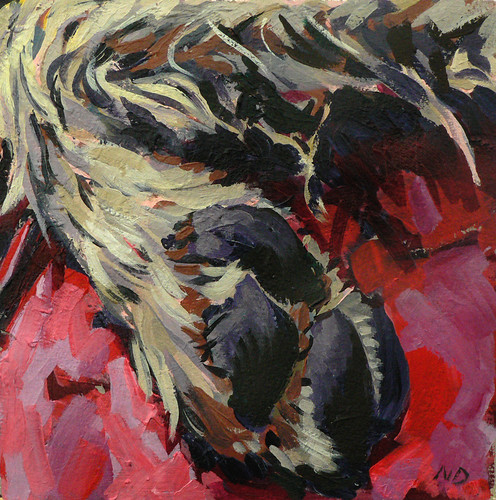
The Parts of My Dog 12 (2007)
I've been struggling a bit with finishing paintings since the beginning of the month, and I'm not really satisfied this one is done either.
Sunday, December 16, 2007
Godzilla versus Stegosaurus (2007)
I managed to finish one of the 5 x 7 inch panels by switching subjects. This may be the first of many toy paintings, or it may be one of a kind. No telling at this point.

Wednesday, December 12, 2007
Tagging Along
I was tagged by Tracy Helgeson with the challenge of listing five things you might not know about me. Seeing as this is an art blog, I should probably be shocking you with factoids like that I have a regular job (ooh!) and wear a tie each day (aah!). Somehow when try to come up with five things, I find that I am just profoundly normal. Well except for:
- When I was a kid, I loved making art, the color lavender, Bobby Sherman, and dressing up in my father's hats to sing show tunes. And I'm straight. Really.
- I am a merciless lobster slayer, with hundreds of kills from decades of beach parties. Three inches of sea water in the tub, drop them in at first boil and loosely cover, seventeen minutes from the second boil, pull an antenna to test. Like a crustacean killing machine.
- My childhood dentist wore a pair of flip-down magnifying glasses as he closed in with the drill, like some bug-eyed reject from a David Lynch movie. And no Novocaine. It's amazing that I've ever been back to any dentist.
- The most famous artists to emerge from my tiny undergrad studio art program are comic strip cartoonists (Watterson and Borgman). I'm kind of proud, but I occasionally ponder whether the Kenyon art department admits that to new prospects.
- If you don't know already, I have a tribute blog for my dog, Pappy. He's like ten times more famous than I'll ever be. His Youtube movies have 200,000 views, and he's going to be on the National Geographic Channel's "Dog Genius" later this month.
Now there is the question of who to tag to pass along this great opportunity. Coming in on the tail end of this thing, I'm having a tough time finding people who haven't just done it among the art blogs I know well. So I am going to do the lazy thing and say-- if you feel inspired to do this tag, please leave me a comment and let me know to come look at your blog. I'd be thrilled to update the post to link to you.
On Exhibit
 I have two pieces in a show at the Touchstone Gallery, 406 7th Street, NW, Washington, DC. The "Art on the Small Side" show, juried by Rosemary Luckett and Jon Wassom, runs from December 12 to January 5. The opening is Friday, December 14 from 6 - 8:30PM. Shouldn't let pleasure get in the way of business, but the opening conflicts with a friend's Christmas party.
Wordless Wednesday: Postcard Art
 If you'd like this free postcard, enter by emailing me at doingart-whorl-gmail-period-com and I'll contact the winner. More Wordless Wednesday here.
Sunday, December 9, 2007
Will Draw for Links Card 4
 Demonstrating that I haven't shut down postcard production altogether, here is a "Will Draw for Links" postcard for Johann. I kind of like the crazed look. If I still owe someone a postcard, please let me know... I'm not terribly well organized as these things go.
Saturday, December 8, 2007
Plexiglas Misadventure
I was framing yesterday for a show, and went to use a set of 1/8" Plexiglas pieces in my frames. These were normal inexpensive pieces of Lucite ES purchased from the local hardware store. I wasn't looking for anything glareproof, so figured this would suffice.
Most artists know that Plexiglas has advantages over glass because it is lightweight and shatterproof, but is much more prone to scratching. What I hadn't realized was that the stuff from the hardware store would have so many imperfections-- little black flecks embedded in the plastic that make it look like there is dirt trapped inside the frame. I'm no perfectionist, in fact I'm barely an adequatist, and I could only use one of the six pieces I had purchased. I guess I'm going to have to investigate whether there are different grades of Plexiglas, because Lucite ES isn't going to cut the mustard.
Most artists know that Plexiglas has advantages over glass because it is lightweight and shatterproof, but is much more prone to scratching. What I hadn't realized was that the stuff from the hardware store would have so many imperfections-- little black flecks embedded in the plastic that make it look like there is dirt trapped inside the frame. I'm no perfectionist, in fact I'm barely an adequatist, and I could only use one of the six pieces I had purchased. I guess I'm going to have to investigate whether there are different grades of Plexiglas, because Lucite ES isn't going to cut the mustard.
Friday, December 7, 2007
The Parts of My Dog 11 (2007)
I have today off to finish up some framing to enter a juried show tomorrow, and to recover from going to a late night Redskins game Thursday (and here's a big shout out to all the other football fans out there in the art community, both of you). I finished this up this morning, and I like it well enough to make it one of the entries for the show. It's a little loud for me, but I'm experimenting a bit for a trendier audience.

Wednesday, December 5, 2007
More on Business Software for Artists
Since my posting of a couple of days ago on business applications for artists, I've started getting contacts from some of the mentioned companies inviting me to review their software. I've already noted that there are no web reviews I have been able to find, and I can imagine it is probably difficult for these niche developers to get independent evaluations. I'm kind of psyched to do some reviews; with few exceptions most of these art management applications have trial versions, and I can imagine people are looking for advice in this area.
Hopefully I'm not getting in way over my head with this. From a technical standpoint, I have a lot of career experience that would help me judge whether each is a well considered, well implemented piece of software. From an art professional standpoint, I unfortunately have limited experience with the business processes of marketing art-- I'm a fairly smart guy, so hopefully I can bridge this gap with some good sense. Another limitation of mine is, having spent a twenty year span working in Information Technology, I probably have a slightly higher than average tolerance for complexity and ugly interfaces. But I am also a "the glass is half empty" kind of guy, which should help compensate. Rest assured, if I see warts you'll know about them.
I'd like to get feedback from readers concerning the features they think are most important in a business application for artists. I find myself a bit torn about whether it is better to have advanced accounting, invoicing, and inventory management in the art management application, or if it is better to have a simpler application that focuses on cataloging art and managing client lists with a dedicated accounting application. A couple of these applications even incorporate calendars and goal setting tools, and I am curious to find out whether these really add value or are just gilding the lily. I hope to develop a features matrix and have some reviews by later this month.
Hopefully I'm not getting in way over my head with this. From a technical standpoint, I have a lot of career experience that would help me judge whether each is a well considered, well implemented piece of software. From an art professional standpoint, I unfortunately have limited experience with the business processes of marketing art-- I'm a fairly smart guy, so hopefully I can bridge this gap with some good sense. Another limitation of mine is, having spent a twenty year span working in Information Technology, I probably have a slightly higher than average tolerance for complexity and ugly interfaces. But I am also a "the glass is half empty" kind of guy, which should help compensate. Rest assured, if I see warts you'll know about them.
I'd like to get feedback from readers concerning the features they think are most important in a business application for artists. I find myself a bit torn about whether it is better to have advanced accounting, invoicing, and inventory management in the art management application, or if it is better to have a simpler application that focuses on cataloging art and managing client lists with a dedicated accounting application. A couple of these applications even incorporate calendars and goal setting tools, and I am curious to find out whether these really add value or are just gilding the lily. I hope to develop a features matrix and have some reviews by later this month.
Tuesday, December 4, 2007
Picking Out The Pieces
I'm busily preparing frames and mats for my application to a local juried show for this Saturday. I have to pick from several of the dog paintings. Sadly, I used two of my favorites in an application for a different show, and I haven't done many I am as excited about in recent weeks. I am picking from PoMD 2, PoMD 3(the left hand half), PoMD 8, PoMD 9, PoMD 10, and would welcome any feedback on your top selections. I am trying to finish two others this week, but with framing I am rapidly running out of time.
Over the past weeks I've been reading several art marketing books, currently Caroll Michel's How to Survive and Prosper as an Artist. As I was reading last night, she takes a fairly dim view of the benefits of juried shows. The idea that they both collect entry fees from all applicants rather than just the selected entrants, and additionally may take a commission of any sales could rub an artist the wrong way. It's a fairly expensive way to get a bullet on your resume, and there will be minimal publicity for the individual artists.
In the case of the show I am applying to, I am a little (just a little) sympathetic with this gallery since they are an artist's coop gallery in downtown DC, and I am sure they have big rent bills and tight margins. Plus I'm at a point where I'm happy enough to apply just to give me some goals for my work.
Over the past weeks I've been reading several art marketing books, currently Caroll Michel's How to Survive and Prosper as an Artist. As I was reading last night, she takes a fairly dim view of the benefits of juried shows. The idea that they both collect entry fees from all applicants rather than just the selected entrants, and additionally may take a commission of any sales could rub an artist the wrong way. It's a fairly expensive way to get a bullet on your resume, and there will be minimal publicity for the individual artists.
In the case of the show I am applying to, I am a little (just a little) sympathetic with this gallery since they are an artist's coop gallery in downtown DC, and I am sure they have big rent bills and tight margins. Plus I'm at a point where I'm happy enough to apply just to give me some goals for my work.
Subscribe to:
Posts (Atom)